- 您现在的位置:买卖IC网 > Datasheet目录299 > 761129 (Spectrum Digital Inc)CODE COMPOSER STUDIO EZDSP F2812 Datasheet资料下载
参数资料
| 型号: | 761129 |
| 厂商: | Spectrum Digital Inc |
| 文件页数: | 2/3页 |
| 文件大小: | 0K |
| 描述: | CODE COMPOSER STUDIO EZDSP F2812 |
| 标准包装: | 1 |
| 类型: | DSP |
| 适用于相关产品: | TMS320F2812 |
| 所含物品: | 板,线缆,CD,电源 |
| 相关产品: | 296-26860-ND - IC DSP W/FLASH 16KX16 176-LQFP TMS320F2812GHHS-ND - IC DSP W/FLASH 16KX16 179-BGA TMS320F2812GHHAR-ND - IC DSP W/FLASH 16KX16 179-BGA 296-18339-ND - IC DSP W/FLASH 128KX16 179-BGA 296-18338-ND - IC DSP W/FLASH 128KX16 179-BGA 296-17280-ND - IC DSP W/FLASH 176-LQFP 296-17279-ND - IC DSP W/FLASH 179-BGA 296-15990-5-ND - IC DSP W/FLASH 176-LQFP 296-15989-5-ND - IC DSP W/FLASH 179-BGA |
Debugger Setup Checklist
1.
2.
3.
4.
5.
6.
Reboot your computer and enter the BIOS setup area.
Set the LPT1 mode to ECP+EPP, ECP, EPP, or bi-
directional. You can skip this step if you have
previously setup your printer port and know the port
address.
Do NOT connect to any hardware at this time.
Insert the Code Composer Studio installation CD into the
CD-ROM Drive. An install screen should appear; if not, go
to Windows Explorer and run setup.exe from the CD-
ROM.
Choose the option to install Code Composer. Respond to
the dialog boxes as the installation program runs. Reboot
your computer if prompted to do so.
Insert the eZdsp CD ROM and install the drivers. The
install path for the drivers must match your Code
Composer install setup path.
Connect up your DSK hardware in the following order:
a.
b.
c.
d.
e.
Plug printer port cable into the PC
Plug printer port cable into the eZdsp
Plug AC power cord into power supply provided
Plug AC power cord into AC power outlet
Plug power supply into the eZdsp
7.
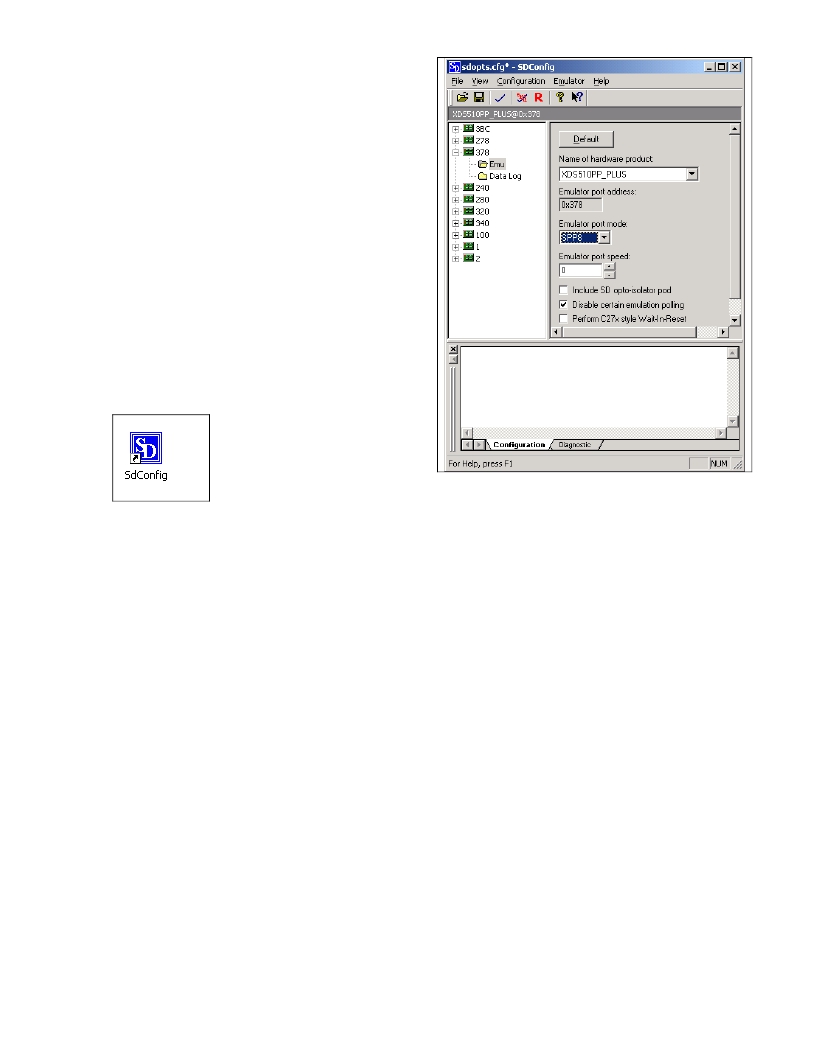
Select the SdConfig from your desktop.
8.
9.
Double click on the emulator ID (port address) that
matches the port address from step 1. If you did not
get printer port information from step 1 above then
do the following:
a.
Remove power from the eZdsp
b.
Select Configuration->Ports Available-
>Printer
c.
This will provide a list of printer ports
available on your PC and the default printer
port mode.
d.
Now select the appropriate emulator ID and
verify/set your configuration as required.
e.
Reconnect power to your eZdsp.
If changes are made in the configuration, select “ File-
>Save ” before continuing. Following is an example
screen for port 0x378, and the default settings. The
eZdsp setup is compatible with the XDS510PP PLUS
emulator.
10. You can reset your eZdsp by selecting the large red
“R” icon in the tool bar. Once your eZdsp is reset
you can proceed with configuring Code Composer.
506266-4001A
Page 2 of 3
12502 Exchange Dr., Ste 440, Stafford, TX. 77477
T:281.494.4505, F:281.494.5310
www.spectrumdigital.com
相关PDF资料 |
PDF描述 |
|---|---|
| 761135 | CODE COMPOSR STUDIO EZDSP F28335 |
| 770156-4 | CONN IDC PLUG 4POS 94V-2 20AWG |
| 7750B | PANEL KIT BOTTOM FOR R-720 CASE |
| 794036-1 | CONN IDC PLUG 4POS 94V-0 18AWG |
| 7B35-01-2 | MODULE ISOL PROCESS I-IN NON-LIN |
相关代理商/技术参数 |
参数描述 |
|---|---|
| 76112WS 008100 | 功能描述:CBL 12COND 26 AWG SHLD MACHFLEX 制造商:belden inc. 系列:* 零件状态:在售 标准包装:1 |
| 76112WS 0081000 | 功能描述:CBL 12COND 26 AWG SHLD MACHFLEX 制造商:belden inc. 系列:* 零件状态:在售 标准包装:1 |
| 76113 | 功能描述:SOCKET TORX 1/4" SQ DRV T10 38MM RoHS:否 类别:工具 >> 插座,套筒扳手 系列:- 标准包装:1 系列:- 类型:钻头,Star(梅花形) 尺寸:TR30 长度:6" (152.4mm) 驱动器尺寸:1/4" 特点:无绝缘 |
| 761130 | 功能描述:开发板和工具包 - TMS320 EZDSP STARTER KIT FOR TMS320R2812 RoHS:否 制造商:Texas Instruments 产品:Experimenter Kits 工具用于评估:F2802x 核心:TMS320 接口类型:UART, USB 工作电源电压: |
| 761131 | 功能描述:开发板和工具包 - TMS320 EZDSP KIT W/O SOCKET FOR TMS320F2808 RoHS:否 制造商:Texas Instruments 产品:Experimenter Kits 工具用于评估:F2802x 核心:TMS320 接口类型:UART, USB 工作电源电压: |
发布紧急采购,3分钟左右您将得到回复。