- 您现在的位置:买卖IC网 > PDF目录255213 > A165E-MGR-02 PUSHBUTTON SWITCH, DPST, MOMENTARY, 3A, 30VDC, PANEL MOUNT-THREADED PDF资料下载
参数资料
| 型号: | A165E-MGR-02 |
| 元件分类: | 开关 |
| 英文描述: | PUSHBUTTON SWITCH, DPST, MOMENTARY, 3A, 30VDC, PANEL MOUNT-THREADED |
| 文件页数: | 9/10页 |
| 文件大小: | 1806K |
| 代理商: | A165E-MGR-02 |
8
A165E
Installation
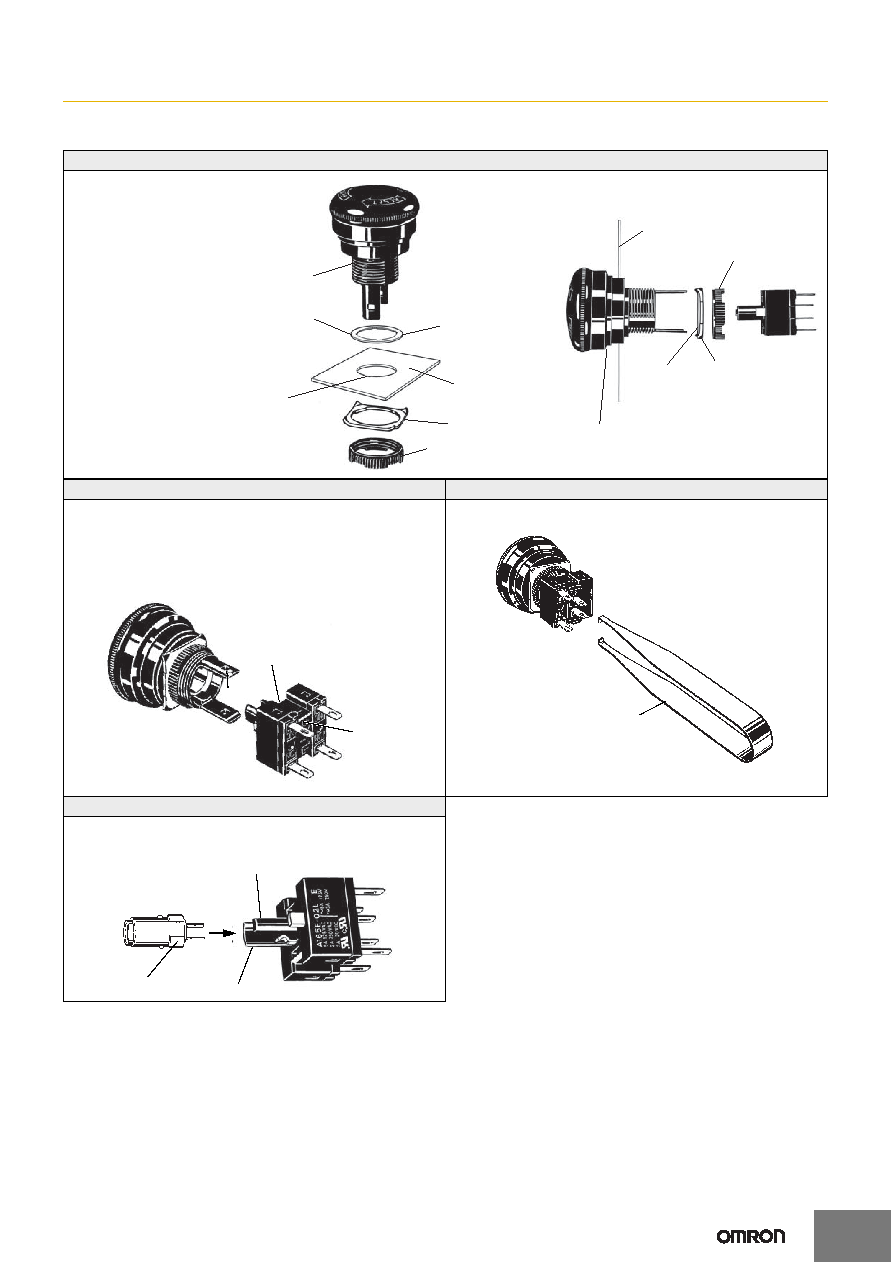
Mounting to the Panel (Models with Separate Construction)
After installing the Operation Unit, snap in the Switch from the back of the panel.
(1) Installing the Operation Unit
(2) Mounting the Switch
(3) Removing the Switch
Snap on the Switch to the Operation Unit.
Make sure that the Switch has the correct orientation when snapping it onto the
Operation Unit.
Align the white dot on the Operation Unit with the guide groove on the side of
the Switch marked with an “L” as shown below, and push the Switch into the
Operation Unit until it clicks into place. Confirm that the Switch is securely in
place before using.
Insert the prongs of the A16Z-5080 Extractor between the Switch and the
Operation Unit, grip the Switch, and pull to remove.
(4) Installing the LED Lamp
When mounting the Lamp, make sure it is facing the direction shown in the
following diagram. Insert the Lamp while matching the protruding part of the
Lamp and the small guides on the outer surface of the switch.
Panel
Mounting nut
Lock ring (included
with the product)
Rubber packing (included with the product)
or Yellow Plate (sold separately)
Edge
Lock
Cutout
Panel
Mounting nut (included
with the product)
Lock hole
Lock ring (included
with the product)
Rubber packing
(included with the
product) or Yellow
Plate (sold separately)
Attach rubber packing or the
Yellow Plate onto the Operation
Unit from its terminal side. Insert
the Operation Unit into the panel
from the front. Install the lock ring
and mounting nut from the
terminal side and tighten.
Adjust the slits on the hole of
rubber packing and Yellow Plate
to the protruding part of the Unit.
Rubber packing is not necessary
when the Yellow Plate is used.
Tighten the nut to the torque of
0.29 to 0.49 Nm.
The Operation Unit should be
installed with its
protruding part adjusted to the slit
of the panel hole.
Align the lock ring to the groove of
the Operation Unit so that the
edge is drawn to the panel side.
White dot
Guide groove
L marking
Extractor (A16Z-5080)
Narrow guide
Protruding part
Wide guide
相关PDF资料 |
PDF描述 |
|---|---|
| AP4E603SZBE | PUSHBUTTON SWITCH, SPST, MOMENTARY, 0.2A, 24VDC, PANEL MOUNT |
| AP4E606TWBE | PUSHBUTTON SWITCH, SPST, MOMENTARY, 0.2A, 24VDC, PANEL MOUNT-THREADED |
| AP4E300TCBE | PUSHBUTTON SWITCH, SPST, MOMENTARY, 0.2A, 24VDC, THROUGH HOLE-STRAIGHT |
| A114132A1NZRQ | KEYLOCK SWITCH, SPDT, LATCHED, 0.35A, 125VDC, PANEL MOUNT-THREADED |
| A116132A1NCRQ | KEYLOCK SWITCH, SP4T, LATCHED, 0.35A, 125VDC, THROUGH HOLE-STRAIGHT |
相关代理商/技术参数 |
参数描述 |
|---|---|
| A165ER24D01 | 制造商:OMRON AUTOMATION AND SAFETY 功能描述:SWITCH UNIT SPST-NC LIGHTED LED |
| A165E-R-24D-01 | 功能描述:控制开关 Socket Unit RoHS:否 制造商:Omron Industrial 控制类型:Emergency Stop 触点额定值:5 A at 125 VAC 触点形式:1 Form B (SPST-NC) 电压额定值: 电流额定值: 执行器:Pushbutton 照明:N 安装风格: |
| A165ES | 制造商:OMRON AUTOMATION AND SAFETY 功能描述:SWITCH UNIT ESTOP NO-LITE 30DIA 制造商:OMRON INDUSTRIAL AUTOMATION 功能描述:Electromechanical Switch Emergency Stop Switch 5A |
| A165E-S | 功能描述:控制开关 ESTOP OPERATOR RoHS:否 制造商:Omron Industrial 控制类型:Emergency Stop 触点额定值:5 A at 125 VAC 触点形式:1 Form B (SPST-NC) 电压额定值: 电流额定值: 执行器:Pushbutton 照明:N 安装风格: |
| A165ES01 | 制造商:OMRON AUTOMATION AND SAFETY 功能描述:SWITCH PUSH SPST-NC 5A 125V 制造商:OMRON INDUSTRIAL AUTOMATION 功能描述:Electromechanical Switch Emergency Stop Switch N.C. SPST 5A |
发布紧急采购,3分钟左右您将得到回复。