- 您现在的位置:买卖IC网 > PDF目录17786 > A3CA-5201 (Omron Electronics Inc-IA Div)LEGEND PLATE PDF资料下载
参数资料
| 型号: | A3CA-5201 |
| 厂商: | Omron Electronics Inc-IA Div |
| 文件页数: | 13/14页 |
| 文件大小: | 0K |
| 描述: | LEGEND PLATE |
| 标准包装: | 1 |
| 其它名称: | A3CA5201 A3CA5201NC |
A3C
Application
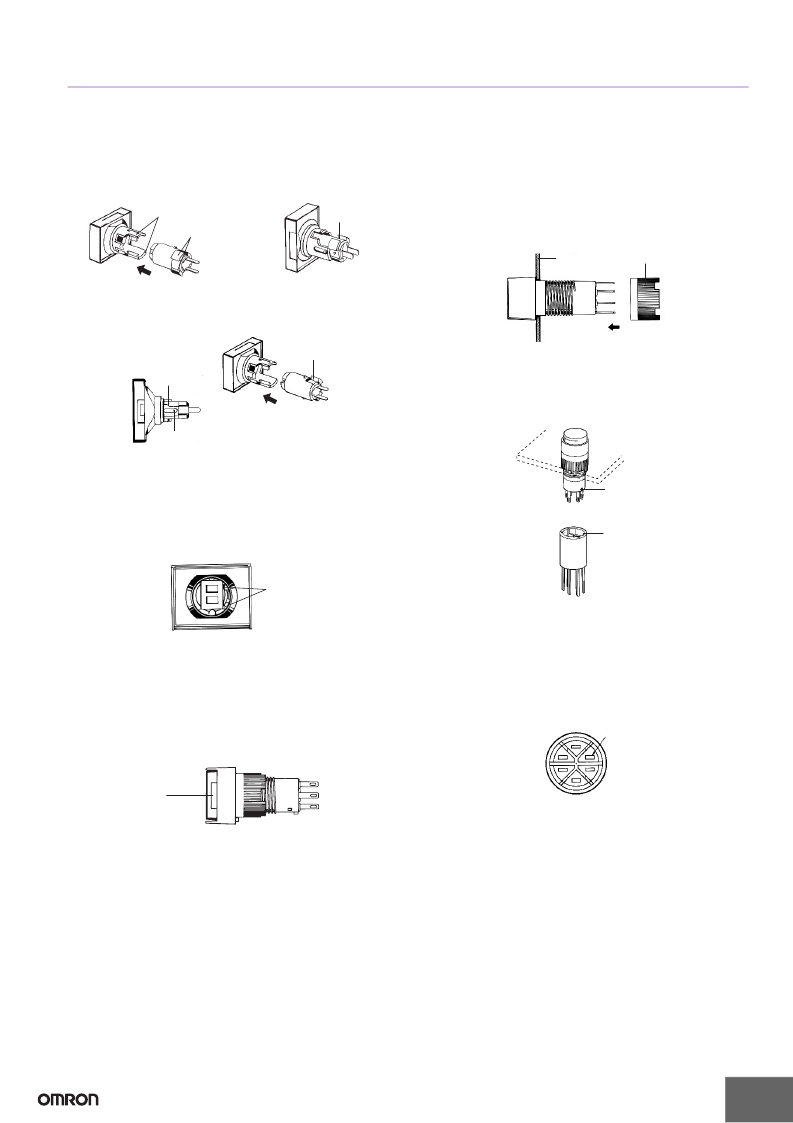
Mounting and Replacing the Pushbutton
(1) Mounting Direction for the Pushbutton/Display and Lamp
Lighted Pushbutton Switch
? Insert the Lamp (incandescent lamp or LED lamp) into the
Pushbutton so that the lamp guide fits into the wider gap between
the projections on the Pushbutton.
Panel Mounting
? Insert the Switch from the front of the panel. Mount the mounting
nut from the terminal end of the Switch and tighten it.
? There are projections on the terminal end of the Switch which may,
depending on the orientation, block the nut. In this case, turn the nut
until it is possible to mount it. Tighten the nut to a torque between
0.20 and 0.39 N·m.
Projection s
LED/l a mp g u ide
LED/l a mp g u ide
? If soldering is used, mount the mounting nut first. Lead wires and
mounds of solder may make it impossible to mount the nut after
soldering.
Mounting nut
Panel
Indicator
? With Indicators, the Lamp is inserted facing the opposite direction
(i.e., at 180 ° ) to that for Lighted Pushbutton Switches.
Groove of the Display
LED/lamp guide
Socket Mounting
? After securing the Switch to the panel using the mounting nut, insert
the Socket into the Switch.
? Align the positioning holes of the Socket with the projections of the
Switch before inserting the Socket.
Projection of the LED/lamp
Note: Push the projections on the Lamp into the grooves on the Pushbutton/
Display.
The Lamp for Lighted Pushbutton Switches moves, but the Lamp for
Indicators is fixed.
Panel
Projection
of the Switch
(2) Mounting Direction for the Pushbutton/Display and Switch
? Insert the Pushbutton/Display into the Switch so that the lamp guide
is aligned with the non-projecting part of the Switch.
? Apply a pressure between 9.8 and 24.5 N.
Positioning
hole of the Socket
Projection
of the Switch
Mounting the Insulation Cover
? After securing the Switch to the panel using the mounting nut, pass
Note: 1. The mounting direction for Indicators is 180 ° to that for Lighted
Pushbutton Switches. Be sure to insert the Legend Plate and other
parts with the correct orientation.
2. If the terminals of the Lamp become bent, it may be impossible to fit
them into the lamp terminal holes. Ensure that the terminals are
straight when they are inserted.
3. Take particular care about the mounting direction with the round
models (A3CT).
(3) Removing the Pushbutton/Display
the lead wires through the holes in the Insulation Cover and then
perform wiring. Hold the Insulation Cover so that the cylindrical hole
is facing the Switch, and insert the lead wires from the end with the
barriers.
? After wiring is completed, mount the Insulation Cover by pushing it
into the Switch.
Insulation Cover attached to Switch
Switch terminal
Hold the recessed portions on the cap of the Pushbutton and pull.
Rece ss
Note: Do not use tools such as pliers to remove the Pushbutton as this may
damage the cap.
13
相关PDF资料 |
PDF描述 |
|---|---|
| BLM21AF121SN1D | FERRITE CHIP 120 OHM 0805 |
| BLM21BB221SN1D | FERRITE CHIP INDUCTOR TYPE 0805 |
| NOME337M006S0023 | CAP NIOB OXIDE 330UF 6.3V 2917 |
| CPPC7-HZ0RT | OSC 5.0V PROG CMOS TRI ST 25PPM |
| TZC3P300A310R00 | CAP TRIMMER 6.5-30PF 100V SMD |
相关代理商/技术参数 |
参数描述 |
|---|---|
| A3CA5201NC | 制造商:OMRON AUTOMATION AND SAFETY 功能描述:LEGEND PLATE |
| A3CA7011 | 制造商:OMRON AUTOMATION AND SAFETY 功能描述:SWITCH UNIT-IP40 制造商:OMRON INDUSTRIAL AUTOMATION 功能描述:SWITCH UNIT-IP40 |
| A3CA-7011 | 功能描述:开关配件 Square Momentary Solder Term IP40 RoHS:否 制造商:C&K Components 类型:Cap 用于:Pushbutton Switches 设计目的: |
| A3CA7021 | 制造商:OMRON AUTOMATION AND SAFETY 功能描述:SWITCH UNIT-IP40 制造商:OMRON INDUSTRIAL AUTOMATION 功能描述:SWITCH UNIT-IP40 |
| A3CA-7021 | 功能描述:开关配件 Square Alternate Solder Term IP40 RoHS:否 制造商:C&K Components 类型:Cap 用于:Pushbutton Switches 设计目的: |
发布紧急采购,3分钟左右您将得到回复。