参数资料
| 型号: | DM163012 |
| 厂商: | Microchip Technology |
| 文件页数: | 16/44页 |
| 文件大小: | 0K |
| 描述: | BOARD DEMO PICDEM FOR 16C781/782 |
| 标准包装: | 1 |
| 相关产品: | PIC16C781-I/P-ND - IC MCU OTP 1KX14 W/AD COMP 20DIP PIC16C782-I/P-ND - IC MCU CMOS 8BIT 2K 20MHZ 20-DIP PIC16C781/JW-ND - IC MCU OTP 1KX14 W/AD COMP20CDIP PIC16C782/JW-ND - IC MCU EPROM 2KX14 COMP 20CDIP |
第1页第2页第3页第4页第5页第6页第7页第8页第9页第10页第11页第12页第13页第14页第15页当前第16页第17页第18页第19页第20页第21页第22页第23页第24页第25页第26页第27页第28页第29页第30页第31页第32页第33页第34页第35页第36页第37页第38页第39页第40页第41页第42页第43页第44页
PICDEM ? MSC1 User ’ s Guide
? Timers
? Memory Access
When a configuration change is made, the register(s) affected by the change
will turn red, calling attention to where the changes occurred. Register values
cannot be entered directly. However, when the Evaluation Board is active,
register values may be retrieved from the Evaluation Board by double-clicking
on the register name. The register font color changes to blue in response.
Changing the Default Font
In some cases, the default font will not fit in the Register Display boxes. You
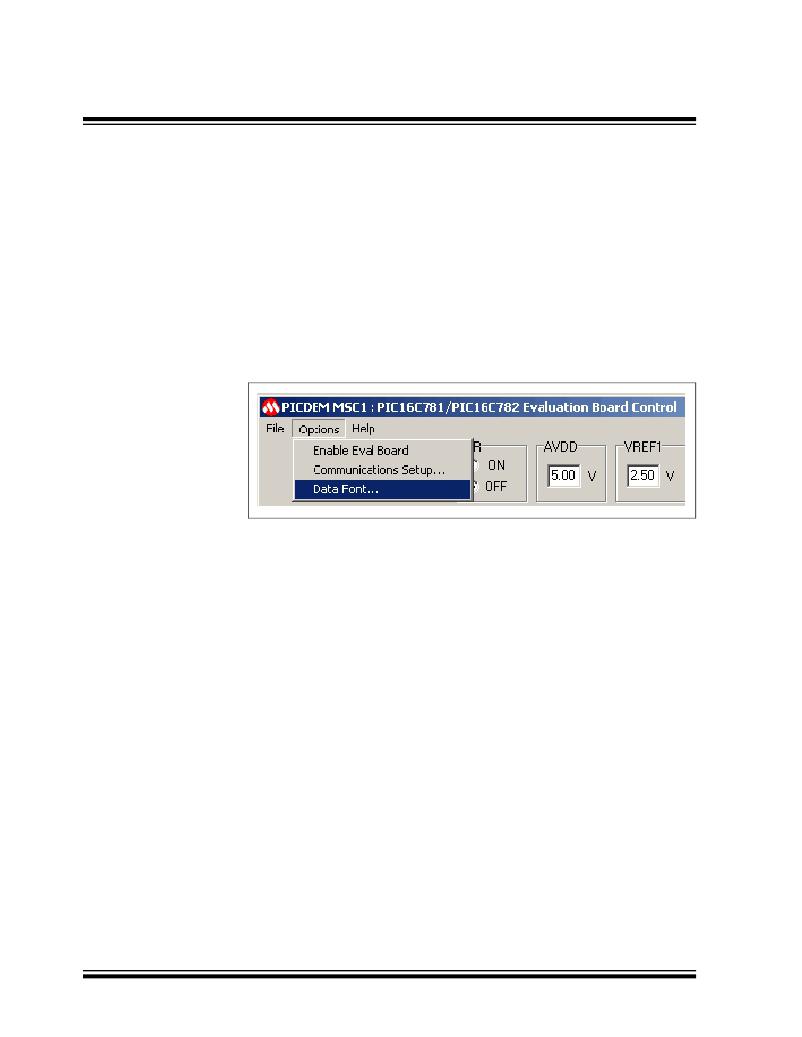
can change the font selection and size with the Options->Data Font menu
option, as shown in Figure 2.5.
Figure 2.5: Data Font Selection
The best results will be obtained by choosing a scalable fixed-spacing font
such as Courier New.
Some controls of the GUI are interlocked so that a change to one selection
automatically selects other controls necessary for the proper operation of the
selected item. For example, selecting PORTA RA0 as the non-inverting Op
Amp input automatically selects RA1 as the inverting input and RB3 as the
Op Amp output.
Special Conventions
A special convention pertains to the following edit boxes:
? PORTA
? PORTB
? Timer0
? Timer1
? Memory Address
? Memory Data
When typing in one of these boxes, the font color changes to red, indicating
that the entry is local only to that box. When the <Enter> key is pressed, the
entry in the box is sent to the corresponding register and the font color reverts
to black. If focus (i.e., clicking outside the box) is moved outside of the edit
box before the <Enter> key is pressed, the box is restored to its original con-
DS41178A-page 12
? 2001 Microchip Technology Inc.
相关PDF资料 |
PDF描述 |
|---|---|
| DM163024 | BOARD DEMO PICDEM.NET 2 |
| DM163025 | PIC DEM FULL SPEED USB DEMO BRD |
| DM163028 | BOARD DEMO PICDEM LCD |
| DM163029 | BOARD PICDEM FOR MECHATRONICS |
| DM164130-3 | BOARD DEMO FOR PIC16F/PIC18F |
相关代理商/技术参数 |
参数描述 |
|---|---|
| DM163014 | 功能描述:开发板和工具包 - PIC / DSPIC PICDEM 4 RoHS:否 制造商:Microchip Technology 产品:Starter Kits 工具用于评估:chipKIT 核心:Uno32 接口类型: 工作电源电压: |
| DM163015 | 功能描述:开发板和工具包 - PIC / DSPIC PICDEM CAN-LIN 3 RoHS:否 制造商:Microchip Technology 产品:Starter Kits 工具用于评估:chipKIT 核心:Uno32 接口类型: 工作电源电压: |
| DM163022 | 功能描述:开发板和工具包 - PIC / DSPIC PICDEM 2 Plus RoHS:否 制造商:Microchip Technology 产品:Starter Kits 工具用于评估:chipKIT 核心:Uno32 接口类型: 工作电源电压: |
| DM163022 | 制造商:Microchip Technology Inc 功能描述:Tools Development kit Interface Type:RS |
| DM163022-1 | 功能描述:开发板和工具包 - PIC / DSPIC PICDEM 2 Plus RoHS:否 制造商:Microchip Technology 产品:Starter Kits 工具用于评估:chipKIT 核心:Uno32 接口类型: 工作电源电压: |
发布紧急采购,3分钟左右您将得到回复。