- 您现在的位置:买卖IC网 > PDF目录17111 > EVAL-ADUC845QSZ (Analog Devices Inc)KIT DEV FOR ADUC845 QUICK START PDF资料下载
参数资料
| 型号: | EVAL-ADUC845QSZ |
| 厂商: | Analog Devices Inc |
| 文件页数: | 6/16页 |
| 文件大小: | 0K |
| 描述: | KIT DEV FOR ADUC845 QUICK START |
| 产品培训模块: | Process Control |
| 标准包装: | 1 |
| 系列: | QuickStart™ 套件 |
| 类型: | MCU |
| 适用于相关产品: | ADuC845 |
| 所含物品: | 评估板、电源、缆线、软件和说明文档 |
| 产品目录页面: | 739 (CN2011-ZH PDF) |
| 相关产品: | ADUC845BCPZ62-3-ND - IC MCU FLASH W/24BIT ADC 56LFCSP ADUC845BSZ8-3-ND - IC MCU FLASH 24BIT ADC 52MQFP ADUC845BSZ8-5-ND - IC MCU FLASH 24BIT ADC 52MQFP ADUC845BSZ62-3-ND - IC MCU FLASH 24BIT ADC 52MQFP ADUC845BCPZ8-3-ND - IC MCU FLASH 24BIT ADC 56LFCSP ADUC845BCPZ8-5-ND - IC MCU FLASH 24BIT ADC 56LFCSP ADUC845BSZ62-5-ND - IC FLASH MCU W/24BIT ADC 52-MQFP ADUC845BCPZ62-5-ND - IC FLASH MCU W/24BIT ADC 56-CSP |
| 其它名称: | EVAL-ADUC845QS EVAL-ADUC845QS-ND |
UG-041
Additional Download/Run Options
The MicroConverter incorporates a serial download protocol
that also allows various download/run options (see uC004 at
C:\ADuC\Documentation\TechNotes provided on the CD).
These options, as well as other options, including erasing code
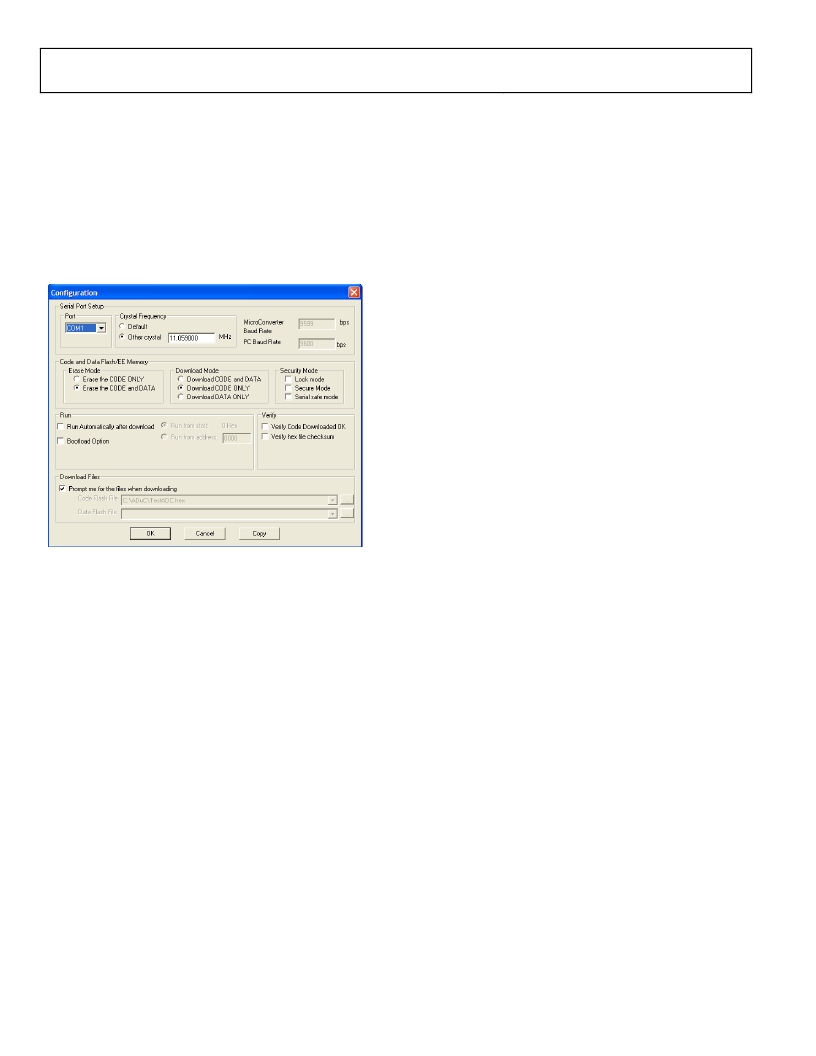
or erasing code and data, can be selected via the Configuration
window as shown in Figure 5. Remember, this window appears
after clicking Configuration on the Windows Serial Downloader
window (see Figure 3). Certain options may be unavailable,
depending on the MicroConverter used.
Figure 5. Configuration Window
On the Configuration window
1. Select Run Automatically after download and click OK .
Evaluation Kit User Guide
The program starts running automatically after the download is
complete; this is indicated by a flashing LED.
USING THE PC COM PORT
Only one application at a time can use the PC serial port.
The WSD uses the PC COM serial port only when
? Resetting the device
? Downloading to the device
? Sending the run command to the device
Therefore, the WSD does not have to be closed before launching
the debugger/WASP/hyperterminal or any other application
that uses the PC COM serial port.
However, if another application that uses the PC serial port
is open, then the WSD is not able to communicate with
the MicroConverter until the PC serial port is released by
disconnecting/closing the other application.
DOWNLOADING VIA THE USB-EA EMULATOR
The USB-EA Emulator for Debugging section discusses using
the USB-EA emulator for debug purposes. However, it is also
possible to use the USB-EA emulator to serially program the
ADuC8xx parts via the EA pin. This does not require a connection
to the UART pins.
After installing the USB-EA emulator, your PC assigns the
emulator a COM port.
When using the USB-EA emulator to download to the
ADuC8xx, select this COM port in the WSD application and
Debugging section.
2.
3.
Enter serial download mode as described in Step 2 in the
Download the required file as described in the Downloading
Rev. B | Page 6 of 16
相关PDF资料 |
PDF描述 |
|---|---|
| HCM15DRXS | CONN EDGECARD 30POS DIP .156 SLD |
| EVAL-ADUC832QSZ | KIT DEV FOR ADUC832 QUICK START |
| HBM15DRXS | CONN EDGECARD 30POS DIP .156 SLD |
| PCX1H270MCL1GS | CAP ALUM 27UF 50V 20% SMD |
| HSM08DRKI | CONN EDGECARD 16POS DIP .156 SLD |
相关代理商/技术参数 |
参数描述 |
|---|---|
| EVAL-ADUC846QS | 制造商:AD 制造商全称:Analog Devices 功能描述:MicroConverter, Dual 16-Bit ADCs with Embedded 62kB FLASH MCU |
| EVAL-ADUC846QSP | 制造商:AD 制造商全称:Analog Devices 功能描述:MicroConverter, Dual 16-Bit ADCs with Embedded 62kB FLASH MCU |
| EVAL-ADUC847QS | 制造商:Analog Devices 功能描述:QUICK START DEVELOPMENT SYSTEM - Bulk |
| EVAL-ADUC847QSP | 制造商:Analog Devices 功能描述:MICROCONVERTER?, 1-CYCLE 8052 MCU + 10-CHANNEL, 24-BIT ADC, - Bulk |
| EVAL-ADUC847QSZ | 功能描述:KIT DEV QUICK START FOR ADUC847 RoHS:是 类别:编程器,开发系统 >> 通用嵌入式开发板和套件(MCU、DSP、FPGA、CPLD等) 系列:QuickStart™ 套件 标准包装:1 系列:PICDEM™ 类型:MCU 适用于相关产品:PIC10F206,PIC16F690,PIC16F819 所含物品:板,线缆,元件,CD,PICkit 编程器 产品目录页面:659 (CN2011-ZH PDF) |
发布紧急采购,3分钟左右您将得到回复。