参数资料
| 型号: | ISL54222IRUEVAL1Z |
| 厂商: | Intersil |
| 文件页数: | 4/5页 |
| 文件大小: | 0K |
| 描述: | EVAL BOARD 1 FOR ISL54222IRU |
| 标准包装: | 1 |
| 系列: | * |
Application Note 1450
DC POWER
SUPPLY
DC POWER
SUPPLY
+
+1.8V
-
+
+5V
-
LOGIC CONTROL
COMPUTER
USB PORT
SEL
J4
VDD
GND
J1
J2
OE
J3
VBUSCH1
J8
JP4
USB
USB TO HOST
TO
DEVICE 1
J5
JP1
U1
JP2
JP5
J6
USB
USB HIGH-SPEED DEVICE 1
TO
DEVICE 2
JP3
J7
USB HIGH-SPEED DEVICE 2
VBUSCH2
J9
ISL54222AEVAL1Z EVALUATION BOARD
NOTE: DISCONNECT THE +5V POWER SUPPLY CONNECTED TO J8 AND J9 WHEN POWERING THROUGH HOST CONTROLLER BUS.
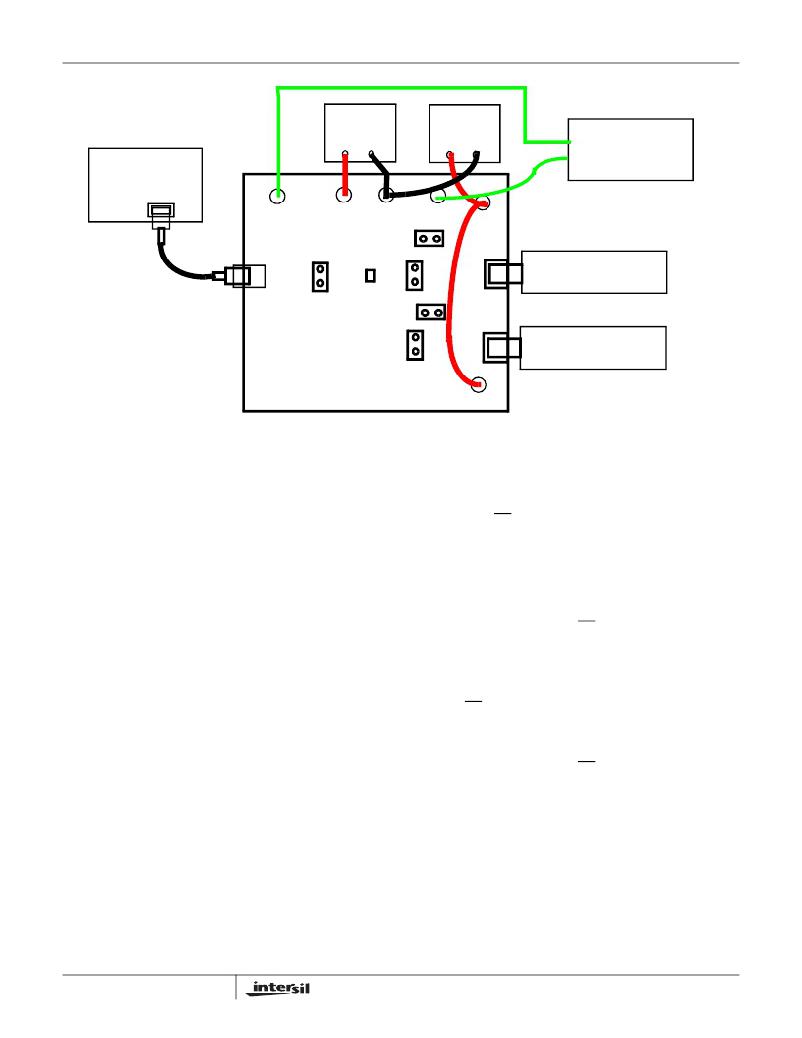
FIGURE 2. BASIC EVALUATION TEST SETUP BLOCK DIAGRAM
Using The Board (Refer to Figure 2)
Lab Equipment
The equipment, external supplies and signal sources
needed to operate the board are listed in the following:
1. +1.8V to +3.3V DC Power Supply
2. +5V DC Power Supply
3. Two High-Speed USB device (i.e. USB memory stick,
MP3 Player, etc.)
4. Computer with 2.0 High-Speed USB port
5. Standard USB Cable
6. Logic Controller
Initial Board Setup Procedure
1. Attach the main evaluation board to a DC power supply
at J1 (V DD ) and J2 (GND). Positive terminal at J1 and
negative terminal at J2. The supply should be capable of
delivering 1.8V to 3.3V and 100μA of current. Set the
supply voltage to 1.8V.
2. Connect a DC power supply at J8 (VBUSHCH1) and J9
(VBUSCH2). Positive terminal at J8 and J9 and negative
terminal at J2 (GND). The supply should be capable of
delivering 5V and 100mA of current. Set the supply
voltage to 5V. This supply will provide 5V at the V BUS pin
of the USB “A” type connectors, J6 and J7.
3. Connect one high-speed USB device at USB connector
J6 and the other high-speed USB device at USB
connector J7. These connectors are located on the right
side of the evaluation board.
4
4. Remove jumpers JP4 and JP5.
5. Drive the OE control pin HIGH to open all switches of the
ISL54222A IC.
6. Connect USB cable from host (PC computer) to the USB
“B” type receptacle, J5 (USB TO HOST).
High-Speed Channel 1 Operation
1. Apply a logic LOW to the SEL pin.
2. Apply a logic LOW to the OE pin.
3. You should now be able to send and receive data
between the computer and the USB device 1 connected
at J6.
4. To disconnect the USB device 1 from the computer take
the OE pin HIGH.
High-Speed Channel 2 Operation
1. Apply a logic HIGH to the SEL pin.
2. Apply a logic LOW to the OE pin.
3. You should now be able to send and receive data
between the computer and USB device 2 connected at
J7.
Test Points
The board has various test points for ease of connecting
probes to make measurements. The test points available are
described in Table 2.
AN1450.1
July 24, 2009
相关PDF资料 |
PDF描述 |
|---|---|
| ISL54406EVAL1Z | EVALUATION BOARD FOR ISL54406 |
| ISL55110EVAL1Z | EVALUATION BOARD FOR ISL55110 |
| ISL55111EVAL1Z | EVALUATION BOARD FOR ISL55111 |
| ISL5629EVAL1 | EVALUATION PLATFORM FOR ISL5629 |
| ISL58125CRZ-EVAL | EVAL BOARD FOR ISL58125CRZ |
相关代理商/技术参数 |
参数描述 |
|---|---|
| ISL54222IRUZ-T | 制造商:INTERSIL 制造商全称:Intersil Corporation 功能描述:High-Speed USB 2.0 (480Mbps) Multiplexer |
| ISL54222IUZ | 制造商:INTERSIL 制造商全称:Intersil Corporation 功能描述:High-Speed USB 2.0 (480Mbps) Multiplexer |
| ISL54222IUZ-T | 制造商:INTERSIL 制造商全称:Intersil Corporation 功能描述:High-Speed USB 2.0 (480Mbps) Multiplexer |
| ISL54223 | 制造商:INTERSIL 制造商全称:Intersil Corporation 功能描述:High-Speed USB 2.0 (480Mbps) Multiplexer |
| ISL54223_09 | 制造商:INTERSIL 制造商全称:Intersil Corporation 功能描述:High-Speed USB 2.0 (480Mbps) Multiplexer |
发布紧急采购,3分钟左右您将得到回复。