- 您现在的位置:买卖IC网 > Datasheet目录989 > MAX5312EVKIT+ (Maxim Integrated Products)KIT EVAL FOR MAX5312 Datasheet资料下载
参数资料
| 型号: | MAX5312EVKIT+ |
| 厂商: | Maxim Integrated Products |
| 文件页数: | 3/10页 |
| 文件大小: | 0K |
| 描述: | KIT EVAL FOR MAX5312 |
| 产品培训模块: | Lead (SnPb) Finish for COTS Obsolescence Mitigation Program |
| 标准包装: | 1 |
| DAC 的数量: | 1 |
| 位数: | 12 |
| 数据接口: | 串行 |
| 设置时间: | 10µs |
| DAC 型: | 电压 |
| 工作温度: | -40°C ~ 85°C |
| 已供物品: | 板,CD |
| 已用 IC / 零件: | MAX5312 |
MAX5312 Evaluation Kit
12) Follow the directions of the Add New Hardware
Wizard to install the USB device driver. Choose the
Search for the best driver for your device option.
Specify the location of the device driver to be
C:\Program Files\MAX5312 (default installation
directory) using the Browse button. During device
driver installation, Windows may show a warning
message indicating that the device driver Maxim
uses does not contain a digital signature. This is not
an error condition and it is safe to proceed with instal-
lation. Refer to the USB_Driver_Help.PDF document
included with the software for additional information.
13) Start the MAX5312 EV kit software by opening its
icon in the Start | Programs menu. The EV kit soft-
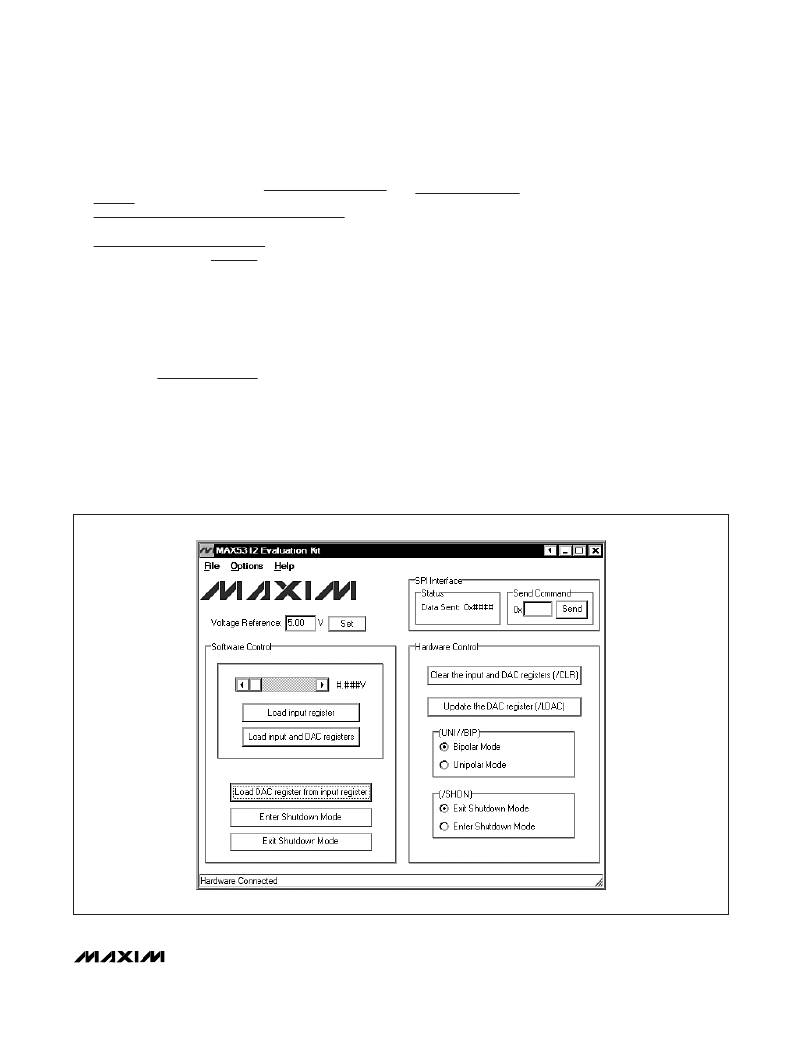
ware main window appears, as shown in Figure 1.
14) Wait approximately 5s for the program to connect to
the hardware.
15) Drag the DAC scrollbar all the way to the right.
16) Press the Load input and DAC registers button.
17) Use the voltmeter to verify that the voltage across the
OUT pad and the SGND pad is approximately +10V.
Figure 1. MAX5312 EV Kit Software Main Window
Detailed Description of
Software
To start the MAX5312 EV kit software, double-click the
MAX5312 EV kit icon that is created during installation.
The GUI main window appears as shown in Figure 1.
The Software Control group box located at the left of
the window controls the DAC registers through the SPI
interface. The Hardware Control group box located at
the right of the window controls the CLR , LDAC ,
UNI/ BIP , and SHDN pins of the MAX5312 by the GPIOs
of the microcontroller. The SPI Interface group box at
the top right allows the user to transfer SPI commands
by entering the commands in the edit box.
Software Control
Use the Software Control group box to set the output-
voltage values for the DAC. Measure the actual refer-
ence voltage on the REF pin of the MAX5312 and enter
the values into the Voltage Reference edit box. These
values will be used to calculate the expected output-
voltage values of the DAC.
_______________________________________________________________________________________
3
相关PDF资料 |
PDF描述 |
|---|---|
| MAX5550EVKIT+ | KIT EVAL FOR MAX5550 |
| MAX5891EVKIT# | KIT EVALUATION FOR MAX5891 |
| MAX6629EVKIT | EVAL KIT FOR MAX6629 |
| MAX6635EVKIT+ | EVALUATION KIT FOR MAX6635 |
| MAX6639EVKIT+ | EVALUATION KIT FOR MAX6639/F |
相关代理商/技术参数 |
参数描述 |
|---|---|
| MAX5312EVKIT+ | 功能描述:数据转换 IC 开发工具 MAX5312 Eval Kit RoHS:否 制造商:Texas Instruments 产品:Demonstration Kits 类型:ADC 工具用于评估:ADS130E08 接口类型:SPI 工作电源电压:- 6 V to + 6 V |
| MAX5316GTG+ | 功能描述:数模转换器- DAC 16-bit V Out SPI DAC w/Digi Gain & Offset RoHS:否 制造商:Texas Instruments 转换器数量:1 DAC 输出端数量:1 转换速率:2 MSPs 分辨率:16 bit 接口类型:QSPI, SPI, Serial (3-Wire, Microwire) 稳定时间:1 us 最大工作温度:+ 85 C 安装风格:SMD/SMT 封装 / 箱体:SOIC-14 封装:Tube |
| MAX5316GTG+T | 功能描述:数模转换器- DAC 16-bit V Out SPI DAC w/Digi Gain & Offset RoHS:否 制造商:Texas Instruments 转换器数量:1 DAC 输出端数量:1 转换速率:2 MSPs 分辨率:16 bit 接口类型:QSPI, SPI, Serial (3-Wire, Microwire) 稳定时间:1 us 最大工作温度:+ 85 C 安装风格:SMD/SMT 封装 / 箱体:SOIC-14 封装:Tube |
| MAX5317GTG+ | 功能描述:数模转换器- DAC 16Bit DAC w/Digital Gain/Offset Control RoHS:否 制造商:Texas Instruments 转换器数量:1 DAC 输出端数量:1 转换速率:2 MSPs 分辨率:16 bit 接口类型:QSPI, SPI, Serial (3-Wire, Microwire) 稳定时间:1 us 最大工作温度:+ 85 C 安装风格:SMD/SMT 封装 / 箱体:SOIC-14 封装:Tube |
| MAX5317GTG+T | 功能描述:数模转换器- DAC 16Bit DAC w/Digital Gain/Offset Control RoHS:否 制造商:Texas Instruments 转换器数量:1 DAC 输出端数量:1 转换速率:2 MSPs 分辨率:16 bit 接口类型:QSPI, SPI, Serial (3-Wire, Microwire) 稳定时间:1 us 最大工作温度:+ 85 C 安装风格:SMD/SMT 封装 / 箱体:SOIC-14 封装:Tube |
发布紧急采购,3分钟左右您将得到回复。