- 您现在的位置:买卖IC网 > Datasheet目录629 > PAXLC800 (Red Lion Controls)COUNTER 8-DIGIT BI-DIR COUNT Datasheet资料下载
参数资料
| 型号: | PAXLC800 |
| 厂商: | Red Lion Controls |
| 文件页数: | 7/8页 |
| 文件大小: | 0K |
| 描述: | COUNTER 8-DIGIT BI-DIR COUNT |
| 产品目录绘图: | PAX Lite Series PAX Lite Series Cut Out |
| 标准包装: | 1 |
| 系列: | PAX®LITE |
| 计数速率: | 25kHz |
| 数字/字母数: | 8 |
| 输入类型: | 电压 |
| 电源电压: | 10 V ~ 16 VDC,115 VAC,230 VAC |
| 显示器类型: | LED 红 |
| 其它名称: | RLC102 |
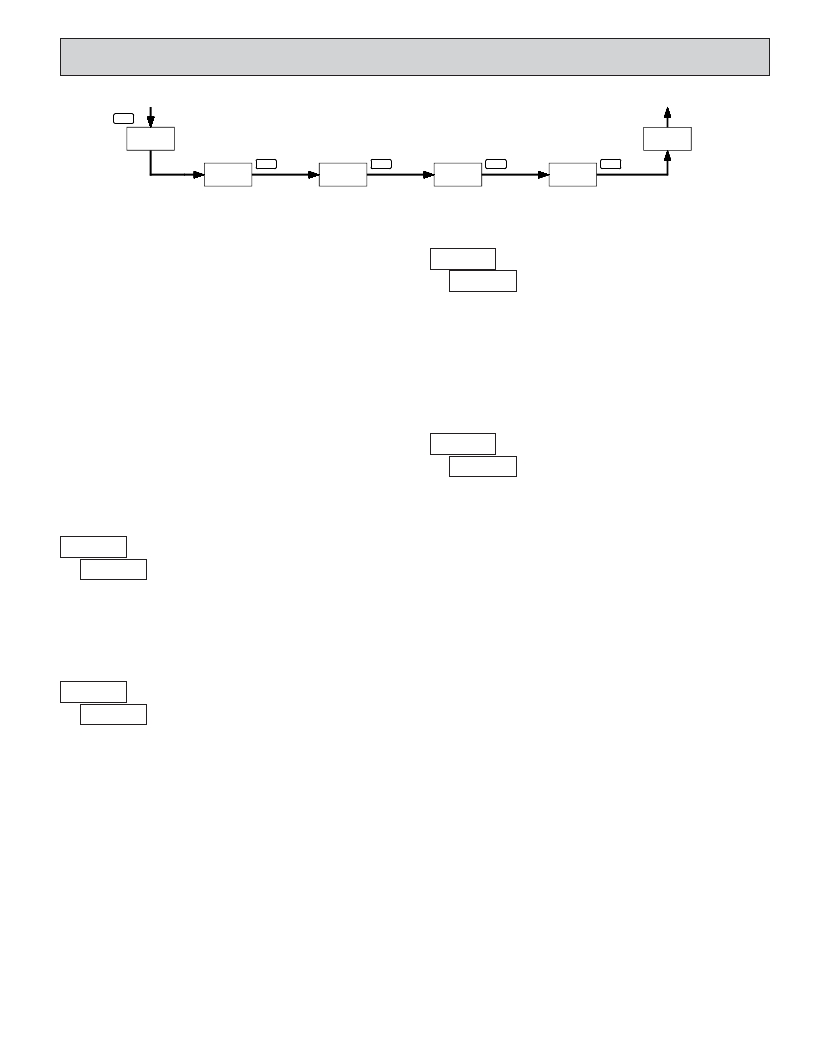
6.0 P ROGRAMMING
THE
M ETER
COUNTER
DISPLAY
PAR
Pro
PROGRAMMING SEQUENCE
COUNTER
DISPLAY
End
dEC Pt
PAR
SC FAC
PAR
SCALEr
PAR
r P-UP
PAR
Decimal
Position
Scale
Factor
Scale
Multiplier
Power-Up
The Totalizer has four programmable parameters which are entered in the
SCALE MULTIPLIER
sequence shown above, using the front panel push buttons.
Before programming, refer to the section on Scaling the Meter to determine
the Decimal Position, Scale Factor and Scale Multiplier to use for the specific
application.
?????? ?
? ?
?
???
????
?????? ?
Note: Programming mode can be locked out with the Program Disable DIP
switch. With the switch in the Disabled (up) position the meter will not enter
programming mode. Refer to the section on DIP switch setup.
PROGRAMMING MODE ENTRY
Press the PAR key to enter Programming Mode. The meter briefly displays
??? followed by the first programming parameter described below.
PROGRAMMING PARAMETERS
In programming mode, the display alternates between the parameter and the
current selection or value for that parameter. The dual display with arrows is
used below to illustrate the alternating display. The selection choices or value
range for each parameter is shown to the right of the alternating display.
DECIMAL POSITION
The number of input counts is multiplied by the Scale Multiplier and the
Scale Factor to obtain the desired process value. A Scale Multiplier of 1 will
result in only the Scale Factor affecting the display. (See details on scaling
calculations.)
Press the arrow keys ( ? or ? ) to sequence through the selection list until the
desired selection is displayed. Press the PAR key to save the selection and exit
programming mode.
COUNTER RESET AT POWER-UP
??? ??
? ??
The totalizer may be programmed to reset at each meter power-up.
PROGRAMMING MODE EXIT
???? ?? ?
? ?
?
???
????
?????
??????
???????
The meter exits Programming Mode when the PAR key is pressed to save the
Scale Multiplier selection. The meter briefly displays ??? upon exiting
Programming Mode. All programmed selections are now transferred to the non-
volatile memory and the meter returns to the Counter display.
This parameter selects the decimal point position on the
display.
Press the arrow keys ( ? or ? ) to sequence through the selection list until the
desired selection is shown. Press the PAR key to save the displayed selection
and advance to the next parameter.
SCALE FACTOR
(If power loss occurs during programming mode, verify parameter changes
and reprogram, if necessary, when power is restored.)
PROGRAMMING MODE TIME OUT
The Programming Mode has an automatic time out feature. If no keypad
activity is detected for approximately 60 seconds, the meter automatically exits
??? ??? ?
? ???????
??????? to ???????
The number of input counts is multiplied by the Scale
Programming Mode. The meter briefly displays ??? and returns to the Counter
display. When automatic timeout occurs, any changes that were made to the
parameter currently being programmed, will not be saved.
Factor and the Scale Multiplier to obtain the desired process value. A Scale
Factor of 1.00000 and a Scale Multiplier of 1 will result in the display of the
actual number of input counts. (See details on scaling calculations.)
The Scale Factor is displayed as a six-digit value with one selected digit
flashing (initially digit 6). Press the ? (up arrow) key to increment the value of
the selected (flashing) digit. Holding the ? key automatically scrolls the value
of the selected digit.
Press the ? (down arrow) key to select the next digit position to the right.
Use the ? key to increment the value of this digit to the desired number. Press
the ? key again to select the next digit to be changed. Holding the ? key
automatically scrolls through each digit position. Repeat the “select and set”
sequence until all digits are displaying the desired Scale Factor value. Press the
PAR key to save the displayed value and advance to the next parameter.
7
FACTORY SETTINGS
The factory settings for the programming parameters are shown above in the
alternating display illustrations. The factory settings can be easily restored by
removing power from the meter, and then pressing and holding the PAR key
while power is reapplied. The meter displays ????? until the PAR key is
released. The normal power-up sequence then resumes, with the factory settings
loaded and saved in non-volatile memory. The Count is reset to 0.
Note: The Program Disable DIP switch must be in the Enabled (down)
position to allow loading factory settings. See section on DIP switch setup.
相关PDF资料 |
PDF描述 |
|---|---|
| PAXLPT00 | METER PROCESS TIME 6-DIGIT |
| PAXLR000 | METER RATE INDICATION 6-DIGIT |
| PB52233SLK | PROJ BOARD COLDFIRE M52 |
| PD412411 | DIODE MOD ISO DUAL 2400V 1100A |
| PF24-30 | TRANSFORMER LO PRO 15VAC 1.6A |
相关代理商/技术参数 |
参数描述 |
|---|---|
| PAXLCL00 | 功能描述:METER CURRENT LOOP 3 1/2-DIGIT RoHS:是 类别:工业控制,仪表 >> 仪表 - 面板,数字 系列:PAX®LITE 标准包装:12 系列:* 其它名称:Q7072030 |
| PAXLCR00 | 制造商:Red Lion Controls 功能描述:Counter; Rate Meter; LCD; 6 Digit, 50-250VDC 制造商:Red Lion Controls 功能描述:COUNT/RATE METER |
| PAXLCRU0 | 制造商:Red Lion Controls 功能描述:UL LISTED CURRENT/RATE METER 制造商:Red Lion Controls 功能描述:PAXL UL COUNT,RATE |
| PAXLHV00 | 功能描述:METER AC VOLT 3-DIGIT PNL MNT RoHS:是 类别:工业控制,仪表 >> 仪表 - 面板,数字 系列:PAX®LITE 标准包装:12 系列:* 其它名称:Q7072030 |
| PAXLIA00 | 功能描述:METER AC CURRENT 3 1/2-DIGIT RoHS:是 类别:工业控制,仪表 >> 仪表 - 面板,数字 系列:PAX®LITE 标准包装:12 系列:* 其它名称:Q7072030 |
发布紧急采购,3分钟左右您将得到回复。