- 您现在的位置:买卖IC网 > PDF目录190063 > PIC16C67 PIC16C67 Rev A Silicon Errata PDF资料下载
参数资料
| 型号: | PIC16C67 |
| 英文描述: | PIC16C67 Rev A Silicon Errata |
| 中文描述: | PIC16C67版本A芯片勘误表 |
| 文件页数: | 17/67页 |
| 文件大小: | 2723K |
| 代理商: | PIC16C67 |
第1页第2页第3页第4页第5页第6页第7页第8页第9页第10页第11页第12页第13页第14页第15页第16页当前第17页第18页第19页第20页第21页第22页第23页第24页第25页第26页第27页第28页第29页第30页第31页第32页第33页第34页第35页第36页第37页第38页第39页第40页第41页第42页第43页第44页第45页第46页第47页第48页第49页第50页第51页第52页第53页第54页第55页第56页第57页第58页第59页第60页第61页第62页第63页第64页第65页第66页第67页
Rev. 2.0, 03/06/02, 15
2.2.3
Excluding a Project File from Build
A file in a project can be individually excluded from build on a configuration by configuration basis.
To exclude a file in a project from build:
1. Push the right mouse button on a file, which you want to be excluded from build, in the “Projects” tab of
the “Workspace” window.
2. Select [Exclude Build file ], where <file> is the selected file, from the pop-up menu (figure 2.5). Then a
red cross will be put on the file’s icon, and the file will be excluded from build.
2.2.4
Including a Project File in Build
An excluded file can be included in the project again.
To include a file which has been excluded from build:
1. Push the right mouse button on a file, which has been excluded from build, on the “Projects” tab of the
“Workspace” window.
2. Select [Include Build file ], where <file> is the selected file, from the pop-up menu. Then a red cross will
be removed from the file’s icon, and the file will be included in build.
2.3
File Extensions and File Groups
The HEW can identify files by their extension. The system defines certain extensions depending upon the tools,
which are being used. For example, if you are using a compiler then the .c extension will be in the “C source
file” group and be used as input to the compiler phase (figure 2.1, Typical Build Process). Additionally, the
HEW allows you to define your own extensions. For example, if the project you are developing uses assembler
source files the default extension may be .src. If you would like to use a different extension instead of .src (e.g.
.asm) then you can define a new extension and request that the HEW treats it in the same way as a .src file.
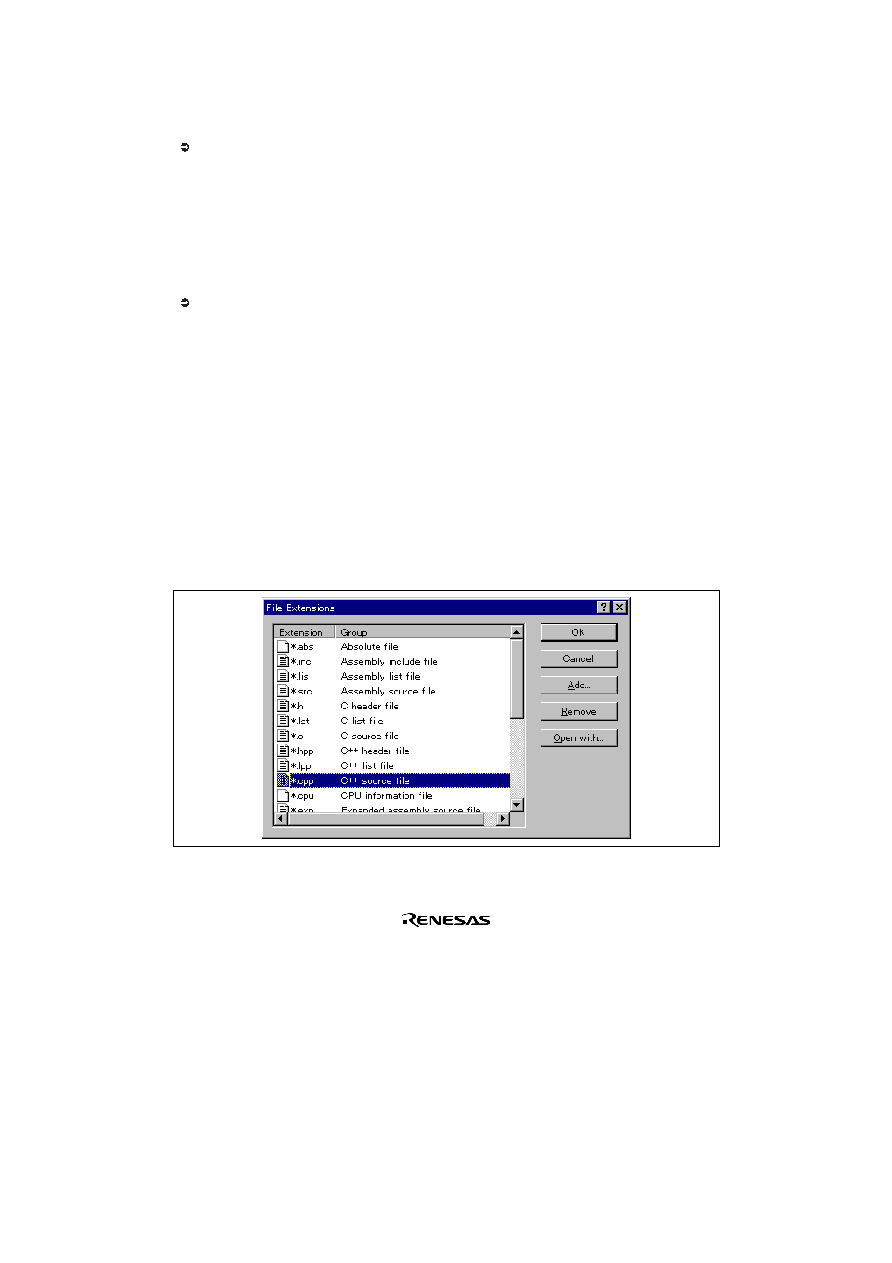
File extensions and file groups can be viewed and modified via the “File Extensions” dialog (figure 2.7). This is
invoked by selecting [Project->File Extensions...]. This dialog displays all of the extensions and file groups,
which are defined within the current workspace.
Figure 2.7: File Extensions Dialog
相关PDF资料 |
PDF描述 |
|---|---|
| PIC16C64X_66X | |
| PIC16C62B | Complete Mid-Range Reference Manual |
| PIC16LC74B | PIC16LC74B-16/PTL16 Datasheet |
| PIC16F688 | Tips 'n Tricks |
| PIC16F83A-10/P | 8-BIT, FLASH, 10 MHz, RISC MICROCONTROLLER, PDIP18 |
相关代理商/技术参数 |
参数描述 |
|---|---|
| PIC16C67/JW | 功能描述:8位微控制器 -MCU 14KB 368 RAM 33 I/O RoHS:否 制造商:Silicon Labs 核心:8051 处理器系列:C8051F39x 数据总线宽度:8 bit 最大时钟频率:50 MHz 程序存储器大小:16 KB 数据 RAM 大小:1 KB 片上 ADC:Yes 工作电源电压:1.8 V to 3.6 V 工作温度范围:- 40 C to + 105 C 封装 / 箱体:QFN-20 安装风格:SMD/SMT |
| PIC16C67-04/L | 功能描述:8位微控制器 -MCU 14KB 368 RAM 33 I/O RoHS:否 制造商:Silicon Labs 核心:8051 处理器系列:C8051F39x 数据总线宽度:8 bit 最大时钟频率:50 MHz 程序存储器大小:16 KB 数据 RAM 大小:1 KB 片上 ADC:Yes 工作电源电压:1.8 V to 3.6 V 工作温度范围:- 40 C to + 105 C 封装 / 箱体:QFN-20 安装风格:SMD/SMT |
| PIC16C67-04/L | 制造商:Microchip Technology Inc 功能描述:8BIT CMOS MCU SMD 16C67 PLCC44 |
| PIC16C67-04/P | 功能描述:8位微控制器 -MCU 14KB 368 RAM 33 I/O RoHS:否 制造商:Silicon Labs 核心:8051 处理器系列:C8051F39x 数据总线宽度:8 bit 最大时钟频率:50 MHz 程序存储器大小:16 KB 数据 RAM 大小:1 KB 片上 ADC:Yes 工作电源电压:1.8 V to 3.6 V 工作温度范围:- 40 C to + 105 C 封装 / 箱体:QFN-20 安装风格:SMD/SMT |
| PIC16C67-04/P | 制造商:Microchip Technology Inc 功能描述:IC 8BIT CMOS MCU 16C67 DIP40 |
发布紧急采购,3分钟左右您将得到回复。