- 您现在的位置:买卖IC网 > Datasheet目录357 > SKP38024 (Renesas Electronics America)KIT STARTER FOR H8/38024 Datasheet资料下载
参数资料
| 型号: | SKP38024 |
| 厂商: | Renesas Electronics America |
| 文件页数: | 3/5页 |
| 文件大小: | 0K |
| 描述: | KIT STARTER FOR H8/38024 |
| 产品培训模块: | Electromagnetic Noise Reduction Techniques Part 1 |
| 标准包装: | 1 |
| 系列: | H8® |
| 类型: | MCU |
| 适用于相关产品: | H8/38024 |
| 所含物品: | SKP 板、在线调试器/编程器、目标缆线、USB 缆线和 SKP 光盘 |
| 产品目录页面: | 753 (CN2011-ZH PDF) |
| 相关产品: | DF38002FP4V-ND - IC H8/38002 MCU FLASH 64LQFP DF38124HWV-ND - IC H8/38124 MCU FLASH 80QFP DF38124HV-ND - IC H8/38124 MCU FLASH 80QFP DF38102HWV-ND - IC H8/38102 MCU FLASH 64QFP DF38124WWV-ND - IC H8/38124 MCU FLASH 80TQFP DF38124WV-ND - IC H8/38124 MCU FLASH 80TQFP DF38122WV-ND - IC H8/38122 MCU FLASH 80TQFP DF38102FPV-ND - IC H8/38102 MCU FLASH 64LQFP DF38002H4V-ND - IC H8/38002 MCU FLASH 64QFP DF38104HWV-ND - IC H8/SLP MCU FLASH 64QFP 更多... |
f.) In the “Project generator information” window:
i.) Click < OK >. The project that is created
has two configurations: The “Release”
configuration can be used for the final
release code version and by default, the
executable does not include debug
information. The “Debug” configuration
allows full source level debugging within
HEW.
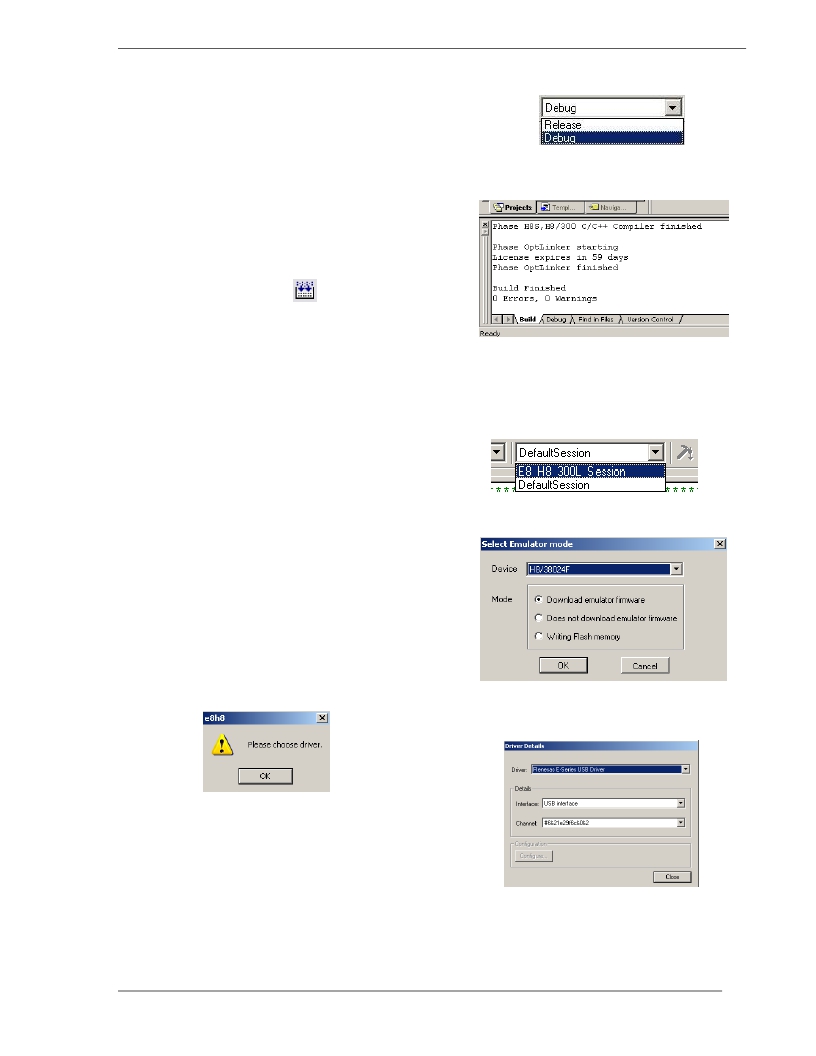
g.) Select the “Debug” build configuration in the
left hand drop down list on the tool bar.
Figure 3: Debug Configuration
h.) Click the “Build” icon
to compile,
assemble and link the project. After the build is
complete, the HEW Build window will look
i.) After ensuring there are no errors, proceed to
Figure 4: HEW Build Complete
NOTE: To learn more on how to use HEW, open the HEW Manual Navigator on your computer (Start >
(All) Programs > Renesas > High-performance Embedded Workshop > Manual Navigator).
4.0 HEW Debugger QuickStart
a.) If not already done, plug one end of the USB
cable into the E8 Debugger and the other into
a USB port on your PC.
Figure 5: HEW Session Selection
b.) Use the Session pull-down box and select
“E8_H8_300L_Session” as shown in F igure 5 .
c.) In the “Select Emulator Mode” window, select
Device “H8/38024F”
i.) Select “Download emulator firmware”.
(F igure 6 )
ii.) Click < OK >.
d.) The first time the E8 is used, you are asked to
choose the driver (F igure 7 ). Click < OK >.
Figure 6: Emulator Mode Selection
Figure 7 : Choose Driver
e.) Select “Renesas E-Series USB Driver”. The
“Details” items will autofill within a few seconds
(F igure 8 ).
i.) Click < Close >.
f.) Accept any dialogue warning that an older
version of the E8 firmware is necessary to
work with the application.
SKP38024 StarterKit Plus Quick Start Guide, rev. 0.3
Figure 8 : Driver Details
Page 3 of 5
相关PDF资料 |
PDF描述 |
|---|---|
| SM-IDC5N | INPUT MODULE DC 34MA 5VDC |
| SM-OACUAH | OUTPUT MODULE AC 44MA 15VDC |
| SM-ODC5A | OUTPUT MODULE DC MINI 18MA 5VDC |
| SM-ODC5ML | OUTPUT MODULE DC MINI 18MA 5VDC |
| SMPA-ISP-ACTEL-3 | PROGRAMMER SILICON SCULPTOR ISP |
相关代理商/技术参数 |
参数描述 |
|---|---|
| SKP38602 | 功能描述:KIT STARTER FOR H8/38602 RoHS:否 类别:编程器,开发系统 >> 通用嵌入式开发板和套件(MCU、DSP、FPGA、CPLD等) 系列:H8® 标准包装:1 系列:PICDEM™ 类型:MCU 适用于相关产品:PIC10F206,PIC16F690,PIC16F819 所含物品:板,线缆,元件,CD,PICkit 编程器 产品目录页面:659 (CN2011-ZH PDF) |
| SKP3G | 制造商:Thomas & Betts 功能描述:PLUG EVERLOK GRD |
| SKP4-50 | 制造商:Tamura Corporation of America 功能描述: |
| SKP470M1AD11-MP | 制造商:JAMICON 功能描述: |
| SKP470M1CD11-BP | 制造商:JAMICON 功能描述: |
发布紧急采购,3分钟左右您将得到回复。