参数资料
| 型号: | TWR-LCD |
| 厂商: | Freescale Semiconductor |
| 文件页数: | 9/13页 |
| 文件大小: | 0K |
| 描述: | LCD MODULE FOR TWR SYSTEM |
| 标准包装: | 1 |
| 附件类型: | LCD 显示器 |
| 适用于相关产品: | Freescale 电源塔系统 |
| 产品目录页面: | 734 (CN2011-ZH PDF) |
connected to the tower system). The USB data signals are connected to the on-board MCF51JM MCU
allow a connection to exist between a host device and the TWR-LCD.
In Boot Loader mode, if the USB cable is connected to a host PC, the TWR-LCD will enumerate as a
Mass Storage Device. If an appropriate compiled binary (.s19) file is placed in the root directory of the
enumerated storage drive, the TWR-LCD will parse the binary file and reprogram the main application
running on the TWR-LCD. Refer to Section 3.6 for more details.
3.6 Bootloader
The TWR-LCD includes a USB bootloader that allows simple “drag and drop” reprogramming. This
section will describe how to use the bootloader.
3.6.1 Obtaining the S19 file
The bootloader accepts srecord or S19 files that it uses to program the board. In the example
projects this file can be found in the <project directory>/bin/ folder and will end in an “.s19” file
extension. This file will get overwritten every time the project is compiled.
To create an S19 file, click on the “Standard Settings…” button on your project, and look for the
Linker category. Select “ColdFire Linker” and make sure that the “Generate S - Record File” option is
checked. Also ma ke sure that the “Max S - Record Length” field is set to 32.
3.6.2 Using the Bootloader
Connect the on-board USB connector to a Windows computer using the included mini-B to A USB
cable and press reset while holding down the BTLD push button.
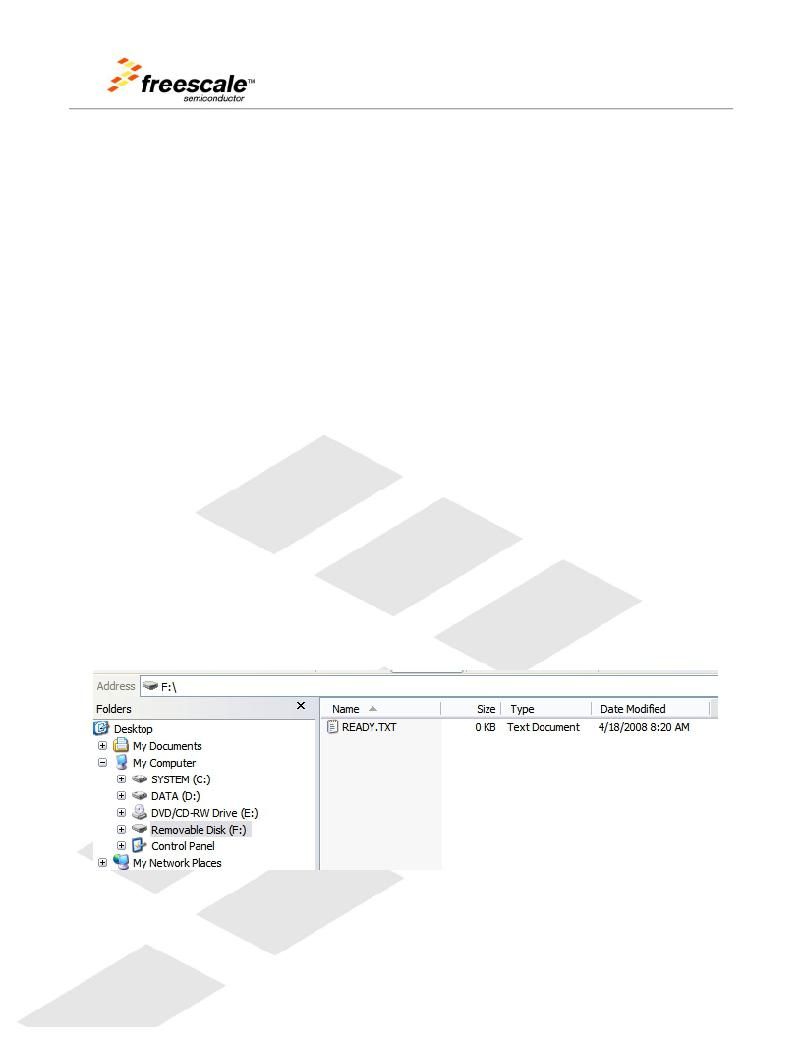
The badge board will then enumerate as a Mass Storage Device. Inside the newly added storage
device, there will be an empty file named “READY.TXT”.
Copy and paste the S19 file into the enumerated drive. Upon successful programming, you will
hear two beeps from the board and the S19 file will appear on the removable drive.
TWR-LCD User’s Manual
Page 9 of 13
相关PDF资料 |
PDF描述 |
|---|---|
| TWR-MC-LV3PH | KIT TOWER SYST 3PH MOTR CTRL MOD |
| TWR-MEM | MEMORY MODULE FOR TWR SYSTEM |
| TWR-PROTO | TOWER SYSTEM PROTO |
| TWR-SER2 | TOWER SYSTEM INTERFACE BOARD |
| TWR-SER | TOWER SERIAL I/O HARDWARE |
相关代理商/技术参数 |
参数描述 |
|---|---|
| TWR-LCD | 制造商:Freescale Semiconductor 功能描述:TOWER SYSTEM - LCD CONTROLLER |
| TWR-LCDC-EPSON | 功能描述:显示开发工具 EPSON DISPLAY CONTROL MOD RoHS:否 制造商:4D Systems 产品:4Display Shields 工具用于评估:?OLED-160-G1, ?OLED-160-G2 接口类型:Serial 工作电源电压:5 V |
| TWR-LCD-RGB | 功能描述:显示开发工具 TWR-LCD-RGB Module RoHS:否 制造商:4D Systems 产品:4Display Shields 工具用于评估:?OLED-160-G1, ?OLED-160-G2 接口类型:Serial 工作电源电压:5 V |
| TWR-LS1021A-PC | 功能描述:TOWER SYSTEM MOD FOR LS1021A 制造商:nxp usa inc. 系列:QorIQ?? 零件状态:在售 板类型:评估平台 类型:MPU 核心处理器:ARM? Cortex?-A7 操作系统:- 平台:Freescale Tower System 配套使用产品/相关产品:LS1021A 安装类型:固定 内容:板 标准包装:1 |
| TWR-M | 功能描述:电缆固定件和配件 Tension Clip Wire Retainer RoHS:否 制造商:Heyco 类型:Cable Grips, Liquid Tight 材料:Nylon 颜色:Black 安装方法:Cable 最大光束直径:11.4 mm 抗拉强度: |
发布紧急采购,3分钟左右您将得到回复。