- 您现在的位置:买卖IC网 > Datasheet目录323 > DV164039 (Microchip Technology)KIT DEV PIC24FJ256DA210 Datasheet资料下载
参数资料
| 型号: | DV164039 |
| 厂商: | Microchip Technology |
| 文件页数: | 22/64页 |
| 文件大小: | 0K |
| 描述: | KIT DEV PIC24FJ256DA210 |
| 产品培训模块: | Intro to PIC24FJDA Family |
| 视频文件: | PIC24FJ256DA210 Development Board Overview |
| 标准包装: | 1 |
| 系列: | dsPIC™ |
| 类型: | MCU |
| 适用于相关产品: | PIC24FJ256DA210 |
| 所含物品: | 开发板,显示板,3 个裸板,MPLAB ICD-3,线缆,电源 |
第1页第2页第3页第4页第5页第6页第7页第8页第9页第10页第11页第12页第13页第14页第15页第16页第17页第18页第19页第20页第21页当前第22页第23页第24页第25页第26页第27页第28页第29页第30页第31页第32页第33页第34页第35页第36页第37页第38页第39页第40页第41页第42页第43页第44页第45页第46页第47页第48页第49页第50页第51页第52页第53页第54页第55页第56页第57页第58页第59页第60页第61页第62页第63页第64页
PIC24FJ256DA210 Development Board User’s Guide
3.4
BUILDING THE CODE
For the loaded project, building the code consists of compiling the source files to create
an object file, GMAP USB Demo PIC24.o , then linking the object file to create the out-
put files GMAP USB Demo PIC24.hex and GMAP USB Demo PIC24.cof . The HEX
file contains the data necessary to program the device, and the .cof file contains
additional information that lets you debug the code at the source code level.
3.4.1
Verifying the Compiler Path
Before building the project, check that the path of the MPLAB C30 compiler is set to the
correct path. The path must be consistent with the location of the compiler when you
installed it.
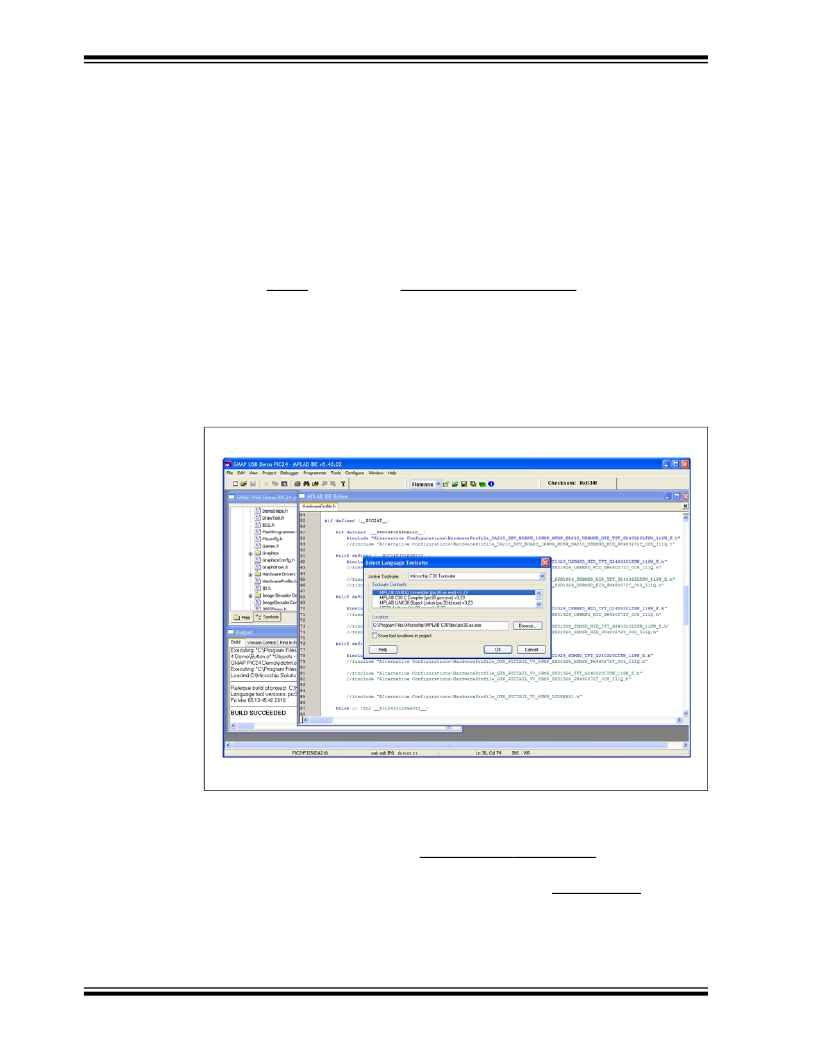
1. At the Project menu, click on Select Language Tool Suite… . This opens the
Select Language Toolsuite dialog (Figure 3-4).
2. Verify that the C30 Toolsuite is selected in the Active Toolsuite list. In the
Toolsuite Contents list, select each item, then verify the path for that item in the
Location box. If necessary, modify the path by clicking on Browse , then
browsing to and selecting the correct location in the dialog that follows.
3. After verifying and/or modifying the paths, click OK to exit.
FIGURE 3-4:
SELECT LANGUAGE TOOLSUITE
3.4.2
Building the Project
Before building the project, set the build for a release version. From the menu bar of
the main MPLAB IDE window, select Project > Build Configuration , then select
Release .
To build the project in the main MPLAB IDE window, select Project > Make . The Build
Output window appears (Figure 3-5).
Observe the progress of the build. When the “BUILD SUCCEEDED” message displays,
you are ready to program the device.
DS51911A-page 22
? 2010 Microchip Technology Inc.
相关PDF资料 |
PDF描述 |
|---|---|
| DV164101 | KIT DEV PICKIT1 FLASH 8/14PIN |
| DV164120 | KIT STARTER PICKIT 2 |
| DV164121 | KIT PICKIT 2 DEBUG EXPRESS |
| DV164122 | ANALYZER SRL PICKIT W/DEMO BOARD |
| DV164131 | KIT STARTER PICKIT 3 |
相关代理商/技术参数 |
参数描述 |
|---|---|
| DV164101 | 功能描述:开发板和工具包 - PIC / DSPIC PICkit 1 8/14P Flash RoHS:否 制造商:Microchip Technology 产品:Starter Kits 工具用于评估:chipKIT 核心:Uno32 接口类型: 工作电源电压: |
| DV164101 | 制造商:Microchip Technology Inc 功能描述:TOOLS: FLASH MICROCONTROLLER ( |
| DV164102 | 功能描述:开发板和工具包 - 无线 rfPICkit RoHS:否 制造商:Arduino 产品:Evaluation Boards 工具用于评估:AT32UC3L 核心:AVR32 频率: 接口类型:USB 工作电源电压:5 V |
| DV164120 | 功能描述:电路内置调试器 PICkit 2 8/14/20P Flash RoHS:否 制造商:Microchip Technology 产品:In-Circuit Debugger Kits 工具用于评估:PIC MCUs, dsPIC DSCs 用于:07-00024, AC164113 核心:dsPIC, PIC 接口类型:USB 工作电源电压:3 V to 5 V |
| DV164121 | 功能描述:电路内置调试器 PICkit 2 Debug Express RoHS:否 制造商:Microchip Technology 产品:In-Circuit Debugger Kits 工具用于评估:PIC MCUs, dsPIC DSCs 用于:07-00024, AC164113 核心:dsPIC, PIC 接口类型:USB 工作电源电压:3 V to 5 V |
发布紧急采购,3分钟左右您将得到回复。