- 您现在的位置:买卖IC网 > PDF目录18722 > SI1000DK (Silicon Laboratories Inc)DEVELOPMENT KIT SI101X PDF资料下载
参数资料
| 型号: | SI1000DK |
| 厂商: | Silicon Laboratories Inc |
| 文件页数: | 7/26页 |
| 文件大小: | 0K |
| 描述: | DEVELOPMENT KIT SI101X |
| 应用说明: | SI1000 Code Examples AppNote |
| 视频文件: | Wireless MCU in a Metering M-Bus Application |
| 特色产品: | Si100x/1x Wireless MCUs with Integrated Sub-GHz RF Transceivers |
| 标准包装: | 1 |
| 类型: | 开发套件 |
| 频率: | 240MHz ~ 960MHz |
| 适用于相关产品: | Si100x |
| 已供物品: | 板,天线,线缆,电源,软件 |
| 产品目录页面: | 626 (CN2011-ZH PDF) |
| 其它名称: | 336-1880 |
Si10xx-DK
3.7. Keil μVision2 and μVision3 Silicon Laboratories Drivers
As an alternative to the Silicon Laboratories IDE, the μVision debug driver allows the Keil μVision2 and μVision3
IDEs to communicate with Silicon Laboratories’ on-chip debug logic. In-system Flash memory programming
integrated into the driver allows for rapid updating of target code. The μVision2 and μVision3 IDEs can be used to
start and stop program execution, set breakpoints, check variables, inspect and modify memory contents, and
single-step through programs running on the actual target hardware. For more information, refer to the μVision
driver documentation. The documentation and software are available on the kit CD and from the downloads
webpage: www.silabs.com/mcudownloads .
4. Hardware Setup using a USB Debug Adapter
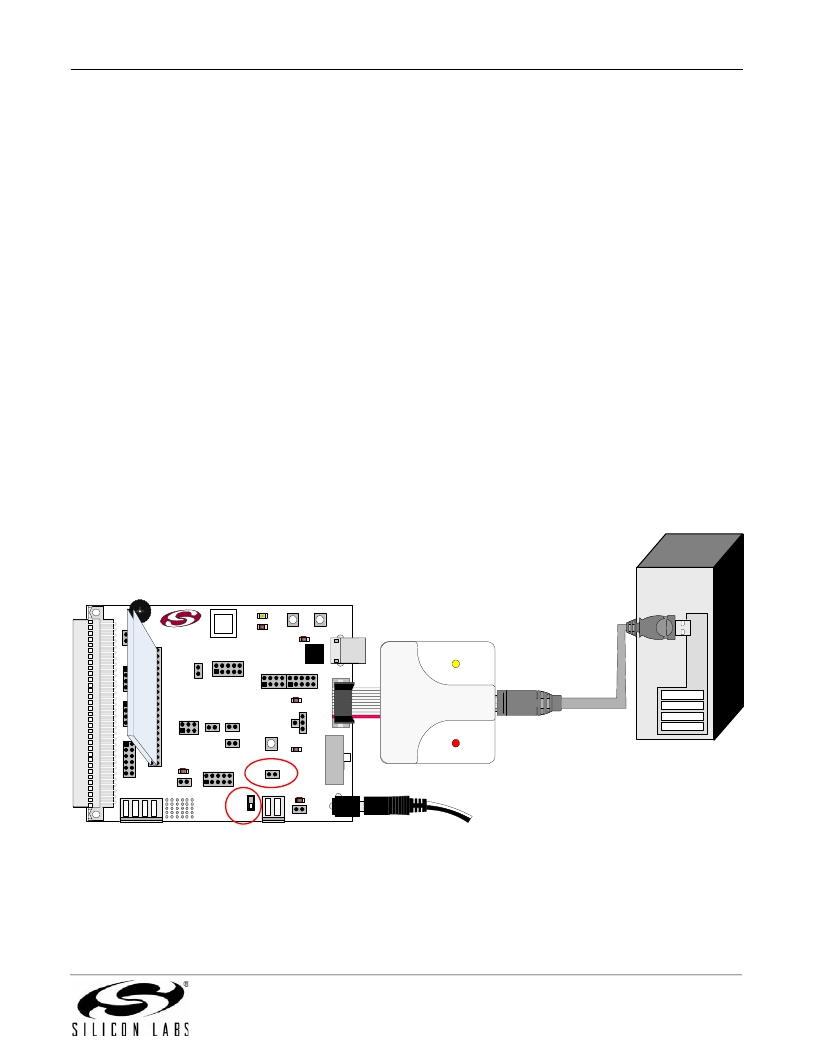
The motherboard is connected to a PC running the Silicon Laboratories IDE via the USB Debug Adapter as shown
in Figure 6.
1. Connect the USB Debug Adapter to the DEBUG connector on the motherboard with the 10-pin ribbon cable.
2. Connect one end of the USB cable to the USB connector on the USB Debug Adapter.
3. Verify that a shorting block is installed on J17 and that SW5 is in the ON position.
4. Connect the other end of the USB cable to a USB Port on the PC.
5. Connect the ac/dc power adapter to power jack P1 on the target board (Optional).
Notes:
?
?
Use the Reset button in the IDE to reset the target when connected using a USB Debug Adapter.
Remove power from the target board and the USB Debug Adapter before connecting or disconnecting the
ribbon cable from the target board. Connecting or disconnecting the cable when the devices have power can
damage the device and/or the USB Debug Adapter.
PC
Motherboard with Daughtercard Attached
R15
J16
J15
J18
P4
SILICON LABS
www.silabs.com
J6
TOUCH SENSE SWITCH
P0.6
J4
P1.6
P1.5
P0.2 P0.3
USB POWER P3
CP
2103
U3
J9
USB Debug
Adapter
USB
J19
J8
+1VD
J11
J12
Cable
J20
J3
J7
J13
J14
COIN_CELL
AAA_BAT
WALL_PWR
+3VD
VBAT
RESET
VDD/DC+
IMEASURE
H1
J5
`
J2
OFF
ON
SW5
J17
H2
VBAT
J1
SW4
P2
AC/DC
Adapter
Figure 6. Hardware Setup using a USB Debug Adapter
Rev. 0.1
7
相关PDF资料 |
PDF描述 |
|---|---|
| 7020-01038-0 | TRANSFORMER CURRENT 100A |
| 7020-01036-0 | TRANSFORMER CURRENT 50A |
| TC25M3C32K7680 | OSCILLATOR 32.7680 KHZ 1.8V SMD |
| TC25L3C32K7680 | OSCILLATOR 32.7680 KHZ 3.3V SMD |
| CGH40120F-TB | BOARD DEMO AMP CIRCUIT CGH40120 |
相关代理商/技术参数 |
参数描述 |
|---|---|
| Si1000-E-GM | 功能描述:射频微控制器 - MCU 64kB 4kB RAM +20 dBm progrmble XCVR QFN42 RoHS:否 制造商:Silicon Labs 核心:8051 处理器系列:Si100x 数据总线宽度:8 bit 最大时钟频率:24 MHz 程序存储器大小:64 KB 数据 RAM 大小:4 KB 片上 ADC:Yes 工作电源电压:1.8 V to 3.6 V 工作温度范围:- 40 C to + 85 C 封装 / 箱体:LGA-42 安装风格:SMD/SMT 封装:Tube |
| Si1000-E-GM2 | 制造商:Silicon Laboratories Inc 功能描述:64KB, 4KB RAM, +20 DBM, PROGRAMMABLE XCVR, QFN42 - Rail/Tube 制造商:Silicon Laboratories Inc 功能描述:64KB 4KB RAM 20DB XCVR QFN42 制造商:Silicon Laboratories Inc 功能描述:RF Microcontrollers - MCU 64kB, 4kB RAM +20 dBm |
| SI1000-E-GM2R | 制造商:Silicon Laboratories Inc 功能描述:64KB, 4KB RAM, +20 DBM, PROGRA 制造商:Silicon Laboratories Inc 功能描述:64KB, 4KB RAM, +20 DBM, PROGRAMMABLE XCVR - Tape and Reel 制造商:Silicon Laboratories Inc 功能描述:IC MCU 64KB FLASH EZ PRO 42LGA |
| SI1000-E-GMR | 制造商:Silicon Laboratories Inc 功能描述:64KB, 4KB RAM, +20 DBM, PROGRAMMABLE XCVR, QFN42 - Tape and Reel 制造商:Silicon Laboratories Inc 功能描述:MCU 64KB FLASH EXRADIO PRO 42LGA 制造商:Silicon Laboratories Inc 功能描述:64kB 4kB RAM +20 dBm progrmble XCVR QFN42 制造商:Silicon Laboratories 功能描述:SI1000-E-GMR |
| SI1000-ESA2-GM | 制造商:Silicon Laboratories Inc 功能描述:MCU 915MHZ SNAP ENABLED 42QFN |
发布紧急采购,3分钟左右您将得到回复。